General
What penci.ly Is, and What It Is Not
Penci.ly is a flexible visual workspace for ideas, plans, research, and creative projects. Here is what I am building, how it differs from traditional tools, and what I do not want it to become.

5 min read
When someone asks me what I am building, I usually describe Penci.ly as a visual workspace for organizing ideas.
That description is accurate, but it is also incomplete.
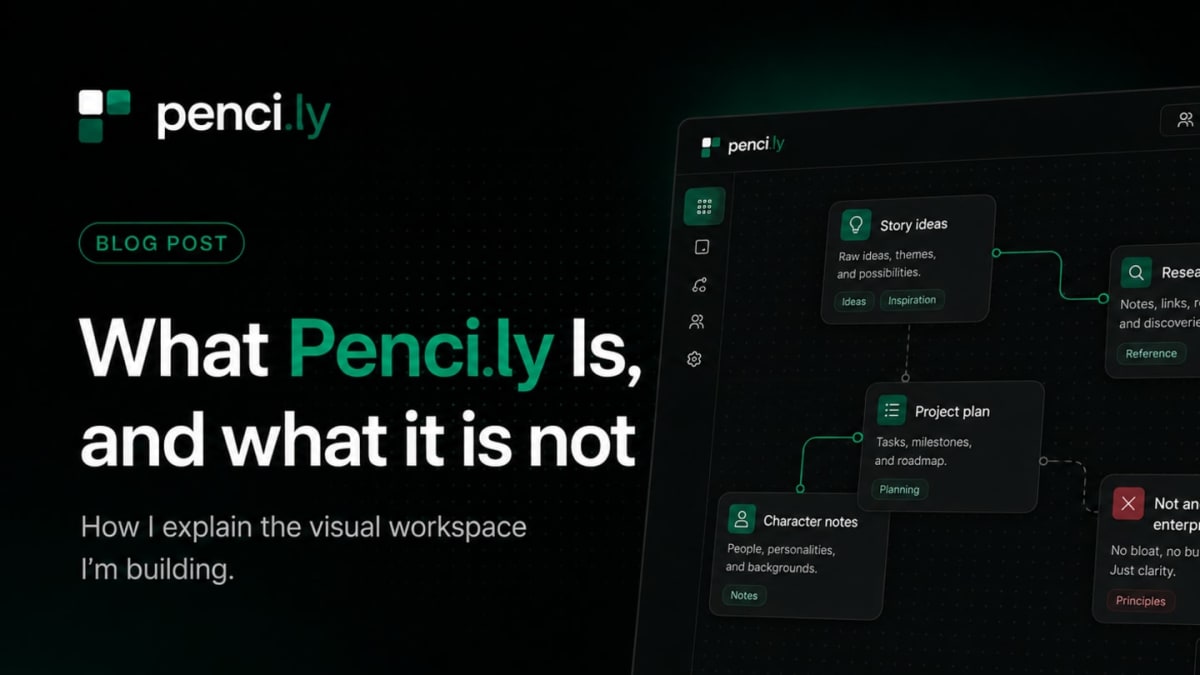
Penci.ly is built around flexible boards and cards. You open a board, place different pieces of information inside it, move them around, connect related ideas, and gradually turn an empty space into something useful.
That could mean planning a project, researching a topic, developing a story, organizing a university assignment, collecting references, outlining a video, or simply trying to understand an idea that is still unclear.
I do not want Penci.ly to tell you exactly how you should work. The board should adapt to the project, rather than forcing the project into a fixed structure.
Why I Started Building It
When I first started thinking about Penci.ly, I was not trying to create another general productivity platform.
I was mainly thinking about the gap between traditional documents and visual whiteboards.
Documents are useful when the information already has a clear order. You begin with a title, write paragraphs underneath it, add sections, and continue from top to bottom.
The problem is that ideas do not always arrive in that order.
Sometimes you begin with a character, then think of a location, then remember a research source, then write a question that changes the entire project. A normal document expects you to decide where everything belongs before you fully understand what you are working on.
Task managers have a similar limitation. They are useful when you already know what needs to be done. You create a task, assign a deadline, mark it as complete, and move to the next one.
However, not every project begins as a list of tasks.
A lot of creative work begins with uncertainty. You might have fragments, references, unfinished thoughts, screenshots, questions, and possible directions. At that stage, turning everything into tasks can make the work feel more rigid than it needs to be.
One thing that kept frustrating me was having to choose between tools that were too structured and tools that were so open-ended that the board became difficult to manage.
Penci.ly is my attempt to find a more useful middle ground.
What a Penci.ly Board Is
A Penci.ly board is a visual space where information can exist in relation to other information.
Instead of placing everything inside one long page, you can separate your work into cards. A card might contain text, an image, a note, a checklist, a reference, or another type of content.
You can then position those cards based on how you think about the project.
For example, someone developing a game could create separate areas for characters, locations, gameplay ideas, visual references, and unanswered questions. A student could place research sources beside arguments, quotes, counterarguments, and possible essay sections. A content creator could organize video ideas, scripts, thumbnails, references, and publishing plans on the same board.
The point is not simply that the cards can be moved around.
The important part is that the layout itself becomes useful. Distance, position, grouping, and connections can help show how different ideas relate to one another.
A traditional document stores information in a sequence. A task manager stores information as actions. A Penci.ly board stores information spatially.
That difference sounds small, but it changes how the work feels.
What Penci.ly Is Not
I do not think every productivity tool needs to become an enterprise platform.
Penci.ly is not meant to become a complicated system filled with dashboards, performance reports, employee monitoring, approval chains, and dozens of settings that most people never use.
There are already established tools designed for large companies with complex operational requirements. I am not trying to replace all of them.
I also do not want Penci.ly to become a collection of unrelated features added only because another platform has them.
It is easy to look at competitors and start building a checklist.
This tool has advanced project management, so Penci.ly should have it. Another tool has video meetings, so Penci.ly should have them. Another one has a built-in document editor, spreadsheet system, calendar, messaging platform, and database, so perhaps Penci.ly should eventually include all of those too.
That approach would quickly destroy the simplicity I am trying to build.
Every feature adds more than functionality. It also adds menus, buttons, settings, decisions, maintenance, and new ways for the interface to become confusing.
This does not mean Penci.ly will remain extremely basic. I have many ideas for new cards, board elements, connections, templates, collaboration features, and ways to make larger projects easier to manage.
However, each feature should support the central experience.
Open a board. Place your ideas. Arrange them. Connect them. Begin working.
If a feature does not improve that process, it probably does not belong in the first version.
The Experience I Am Trying to Create
I want opening a blank Penci.ly board to feel inviting rather than intimidating.
A completely empty space can sometimes create pressure. You might feel that you need to design the perfect system before adding anything.
I want the opposite.
You should be able to create one card, write a rough thought, and continue from there.
You should not need to decide whether your project follows a specific productivity method. You should not need to build a database before writing your first idea. You should not need to understand a complicated hierarchy of workspaces, projects, pages, lists, and subtasks.
You should be able to begin with whatever you already have.
A sentence. An image. A question. A reference. A character name. A plan for the week. A problem you are trying to solve.
Then the structure can appear naturally as you add more.
I am still experimenting with parts of this experience. I have changed how cards look, how boards behave, how controls appear, and how much information should remain visible at once.
Some ideas looked good in mockups but felt distracting when I actually used the editor. Other features seemed minor at first but became much more important once I started building real boards.
This is not finished yet, but the direction is becoming clearer.
Penci.ly should feel flexible without feeling empty, visual without becoming chaotic, and useful without becoming unnecessarily complicated.
That is the simplest way I currently know how to explain what I am building.
If you opened a completely blank Penci.ly board today, what would you personally use it for?